
Run a wizard
What you see when you open a wizard’s link, on a computer or a phone.
From the link to the result
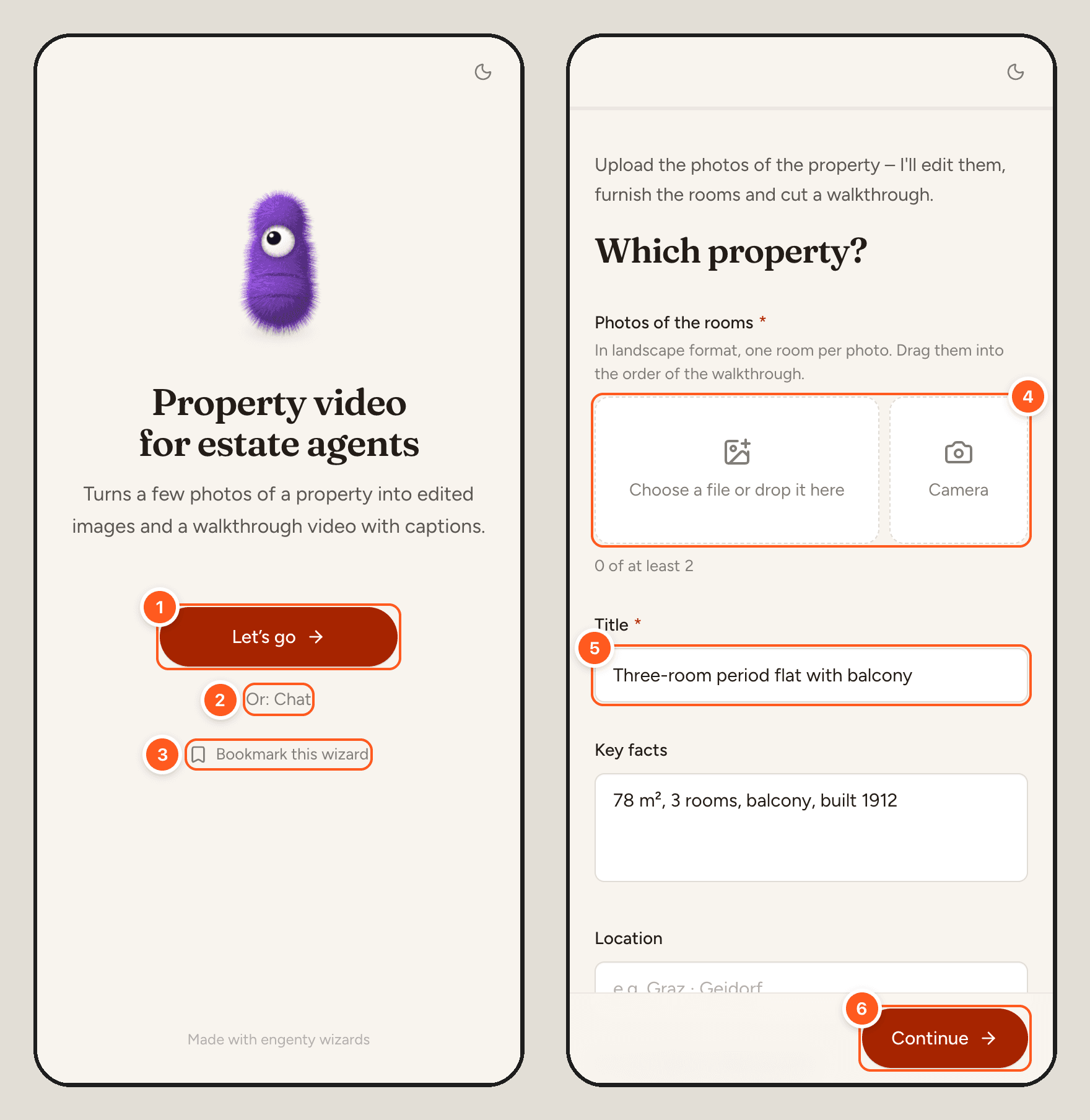
- “Let’s go” starts a run. The link opens the wizard on this screen.
- “Or: Chat” runs the same wizard as a chat, where its owner switched that on.
- “Bookmark this wizard” shows how to keep it in your bookmarks. Where the phone offers it, “Add to home screen” puts it there like an app.
- A photo field takes pictures from the library, or from the camera page after page.
- A text field. Pages ask their questions; a star marks what must be filled in.
- “Continue” takes you to the next page, “Back” to the one before.
While an AI step works, the page says what it is doing, and the screen stays on. A review shows what was made: “Looks good” accepts it, “New version” asks for another one with a note on what should change, and “Edit” lets you change a text by hand. The result page offers the downloads, “Copy text” and “Share”.
If you left a run, you can pick it up again with “Continue your last run”. A wizard written in another language than yours is translated for you (“Machine-translated”); “Show original” shows its own words.
As a chat
Where the owner switched it on, the wizard also runs as a chat, at …/chat or straight on its
link. It asks one question at a time. You answer in the composer or with the replies under the
question, and every answer stays in the chat. The composer has these buttons:
| Button | Does |
|---|---|
| Speaker (“Read aloud”) | Reads what the wizard says aloud, with the browser’s own voice in the wizard’s language. It costs nothing and stays on in this browser |
| Microphone (“Dictate”, ⌘⇧M, Ctrl⇧M on Windows) | Dictates into the composer. Where the browser can recognise speech, it writes along. Elsewhere the wizard’s own model writes the recording down when you stop, like a voice note |
When a step works on a website, the chat shows that page live with what the wizard just did. “Take over” lets you click and type in it yourself while the wizard waits. “Hand back” lets the wizard go on from where you left the page.
On a phone
| The wizard asks for | The phone gives |
|---|---|
| Photos | The camera, page after page, or pictures from the library |
| A paper | The camera as a scanner |
| A short clip | The camera, up to 30 seconds |
| A serial or ticket number | “Scan” reads a QR code or barcode |
| Where you are | “Use my location”, with its accuracy. You can type an address instead |
| What happened | “Record a voice note”, up to 5 minutes |
| A sign-off | “Sign here”, with your finger |
Your browser asks before it uses the camera, the microphone or your location. If you denied one, allow it in your browser’s site settings (the lock icon in the address bar). Or use the fallback the field offers: choose a photo, type the address or choose an audio file.
With “Tell me when it’s done” you can switch apps during a long step: a notification, a sound or a buzz brings you back.
Photos and files you upload
engenty wizards checks each file before the wizard keeps it:
- A photo is drawn again. It looks the same and stays upright. It loses where it was taken, the camera’s details and anything else hidden in the file.
- A file must be what its type says. A page that calls itself a photo is refused, and the wizard says why.
- A photo can have up to 50 megapixels. Phones take smaller ones.
- Some pictures are kept as they are: GIFs, moving WebPs, and HEIC photos from an iPhone, their location included. An iPhone usually sends a web page a JPEG instead.
The checks run where engenty wizards runs. Your files don’t go to another service for them.
When the wizard needs you
| It shows | Because | You |
|---|---|---|
| A website live, with a sign-in | A step met a login, a captcha or “continue with Google” | Fill in the fields shown, or click and type in the live page itself. Then choose “Sign in” or “I’m signed in”. What you enter goes straight into the page, and the AI never sees it. “Remember this sign-in for next time” stores it encrypted. “Skip” goes on without the site |
| “The wizard wants to run this in …” | A step wants to change something in a service you connected | Choose “Allow”, “Allow for the rest of this run” or “Don’t allow”. Reading doesn’t ask, deleting always does |
| “Connect” | The wizard works with your own account of a service | Sign in to the service in a new tab. The connection is kept for your next run |
What this wizard remembers
A wizard can keep lists, files and connected accounts for your next run. Only you see them. The link “What this wizard remembers” below the wizard’s pages shows what is kept, and “Delete everything” deletes it. Anything nobody used for 400 days is deleted by itself.
Share a result
“Share” on the result page opens the ways to pass the result on. “Link” makes a link to the result: copy it, send it by email or hand it to another app. When you ran the wizard over its link, the result and its link are kept for 7 days. “Withdraw link” ends the link earlier.
The other tiles send or publish the result itself. Each one walks you through its steps: the account it sends with (“Account”), what goes along and where it goes (“What & where”), then “Send”. What happens shows in the same window, and “Recent” lists what was sent before. An account you connect is kept for your next run, encrypted. “What this wizard remembers” lists it.
| Tile | Does | Needs |
|---|---|---|
| “Email” | Sends the files you pick as attachments to one or more addresses | Your mailbox: Gmail, Outlook or any mailbox over SMTP. Where the server sends from an address of its own, no account |
| Google Drive, OneDrive, S3 | Saves the files into a folder, which is created if it doesn’t exist yet | The account |
| “Slack” | Posts your message with the link to the result in a channel | Your Slack account |
| A connected service | An AI agent does what you describe in the service, with its actions, and asks before every change | The account, and a few minutes |
| “Website” | The wizard opens the site in its browser, and an AI agent posts there what you describe. You sign in yourself, and it asks for your leave before anything goes public | A few minutes. LinkedIn, X, Facebook, Instagram and Meta Ads are ready as presets |
Which tiles a result offers is the wizard’s choice, see The result. Without one, every tile that needs no AI agent is there for everyone with the link. The agent tiles are there for the wizard’s owner in the studio, as they spend the wizard’s credits.
Media made by a model carries an “AI-generated” label. Whoever publishes it has to label it as AI-generated. The file already carries the marking.